
 MElkhateeb
➡️ Introduction
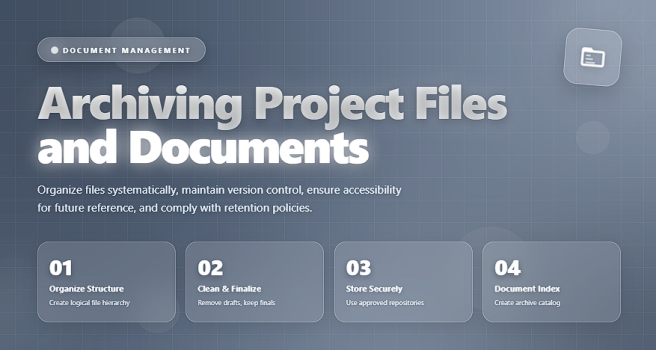
When a project ends, the work is not fully complete until its documents are organized, stored, and preserved. This final step — project file archiving — is often overlooked, yet it plays a critical role in compliance, knowledge retention, audit readiness, and future project efficiency.
Top 5 Project Management Software
A well-structured archive ensures that:
✔️ the organization retains valuable knowledge
✔️ future teams avoid repeating past mistakes
✔️ audits, disputes, or warranty claims can be handled smoothly
✔️ regulatory and contractual requirements are met
Archiving is not about “keeping everything.” It is about storing the right information in the right place with the right level of control.
✅ What Is Project Archiving?
Project archiving is the formal process of collecting, organizing, securing, and storing all key project documents after closure. These documents may include:
- contracts
- financial records
- requirements documentation
- design files & technical specifications
- test results & QA records
- change logs
- risk registers
- deliverables
- communication records
- final reports and approvals
The goal is to ensure quick retrieval when needed — even years after project completion.
✅ Why Archiving Matters
Archiving is more than good housekeeping. It provides strategic benefits:
✔️ 1. Protects the Organization
Archived documents can resolve legal disputes, clarify decisions, or prove that scope was delivered as agreed.
✔️ 2. Preserves Knowledge
Future project managers can learn from historical data, decisions, and mistakes.
✔️ 3. Supports Audits and Compliance
Many industries require documentation retention for 3, 5, or even 10 years.
✔️ 4. Enables Smooth Transitions
If team members leave, knowledge doesn’t leave with them.
✔️ 5. Improves Future Planning
Reference documents reduce estimation errors and improve forecasting.
✅ What Documents Should Be Archived?
A complete archive typically includes:
✔️ 1. Administrative Documents
- Project charter
- Scope statement
- Work breakdown structure
- Governance documents
✔️ 2. Planning Documents
- Schedules
- Budgets
- Resource plans
- Risk & issue logs
- Quality plans
✔️ 3. Execution Phase Records
- Meeting minutes
- Status reports
- Change logs
- Communication records
- Vendor correspondence
✔️ 4. Technical and Product Documentation
- Designs
- Specifications
- Test reports
- User guides
- Release notes
✔️ 5. Financial and Contractual Documents
- Invoices
- Vendor contracts
- Purchase orders
- Payment schedules
- Warranty agreements
✔️ 6. Final Project Documentation
- Final deliverables
- Acceptance certificates
- Post-implementation review
- Lessons learned report
✅ How to Archive Project Files Step-by-Step
✔️ 1. Identify What Needs to Be Kept
Review organizational policies and regulatory requirements.
Different industries have different retention rules.
✔️ 2. Clean and Organize Files
Remove duplicates, outdated drafts, and unused working files.
Keep only final, approved versions.
✔️ 3. Create a Logical Folder Structure
Organize by:
- phase (initiation → planning → execution → closure)
- workstream
- document type
- year
A standard structure ensures consistency across all projects.
✔️ 4. Apply Naming Conventions
Use descriptive names such as:2025-03-ClientApproval-DesignSpec-v4.pdf
Consistent naming improves searchability.
✔️ 5. Ensure Security and Access Control
✔️ restrict access based on sensitivity
✔️ remove temporary user access
✔️ apply encryption for confidential files
✔️ 6. Store Files in a Long-Term Repository
Recommended options include:
- SharePoint
- Google Workspace
- OneDrive for Business
- Confluence
- Company servers
- Archiving systems (Documentum, OpenText, etc.)
✔️ 7. Verify Accessibility
Check that all key files:
✔️ open correctly
✔️ are readable
✔️ use long-term stable formats (PDF, CSV)
✔️ 8. Document the Archive Location
Record where the files are stored and who has access.
This metadata is essential for audits and future retrieval.
✔️ 9. Obtain Final Approvals
Before closure, confirm:
✔️ all files are archived
✔️ the archive meets policy requirements
✔️ stakeholders sign off
❌ Common Archiving Mistakes
❌ Keeping all drafts and working documents
❌ No consistent naming conventions
❌ Storing files across scattered platforms
❌ Failing to protect sensitive data
❌ Archiving before validating document completeness
❌ Forgetting to capture final decisions or approvals
⭐ Best Practices for Effective Project Archiving
✔️ Use organizational templates for folder structure
✔️ Archive in stages — don’t wait until the end
✔️ Convert key documents to PDF/A for long-term preservation
✔️ Add metadata (owner, creation date, summary)
✔️ Ensure backup and version control is enabled
✔️ Train team members on documentation discipline
⭐ Final Thoughts
Archiving is not simply the last step in the project lifecycle —
it is a strategic investment in organizational memory, accountability, and future project success.
A well-structured archive protects the organization, supports future projects, and ensures that valuable knowledge is not lost.
Great project managers don’t just deliver results —
they preserve the knowledge that makes future success possible.






