
 MElkhateeb
➡️ Introduction
Every project carries uncertainty — deadlines can slip, costs may rise, technologies may fail, and stakeholder expectations may shift.
To manage this uncertainty effectively, project managers rely on a foundational tool: the Risk Register.
Top 5 Project Management Software
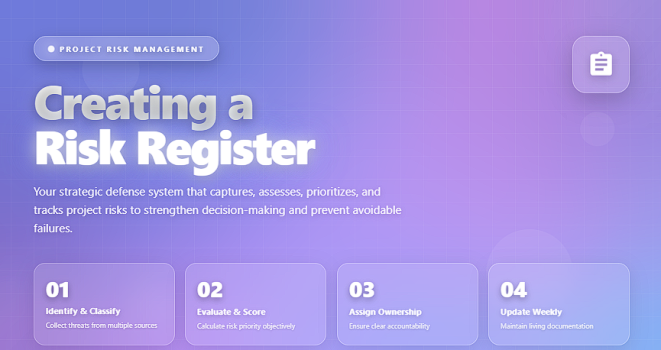
A risk register allows you to capture, assess, prioritize, assign, and track risks throughout the entire project lifecycle.
Without it, teams react too late, decision-making becomes emotional, and risks evolve into costly issues.
This guide explains what a risk register is, why it matters, and how to create one step-by-step, using best practices adopted by top-performing organizations.
✅ What Is a Risk Register?
A risk register — also known as a risk log — is a structured document used to track all potential risks that could affect a project’s scope, schedule, cost, quality, or resources.
It contains essential information such as:
✔️ risk description
✔️ likelihood & impact
✔️ triggers
✔️ mitigation actions
✔️ response strategy
✔️ assigned owner
✔️ current status
The risk register becomes a single source of truth that ensures transparency, accountability, and early intervention.
✅ Why a Risk Register Matters
A well-built risk register helps you:
✔️ foresee problems before they occur
✔️ strengthen planning and forecasting
✔️ align stakeholders around risk exposure
✔️ assign clear accountability
✔️ support evidence-based decision-making
✔️ prevent small problems from becoming major issues
In high-risk or complex projects, a reliable risk register is not optional — it is mission-critical.
✅ Key Components of a Risk Register
Essential fields that make your risk log complete and actionable.
| Component | Description | Why It Matters |
|---|---|---|
| Risk ID | Unique identifier for tracking and reporting. | Prevents confusion and maintains order. |
| Risk Description | Clear statement of what could happen. | Ensures shared understanding. |
| Category | Groups risks (schedule, cost, technical, etc.). | Improves organization and filtering. |
| Likelihood | How probable the risk is. | Supports prioritization. |
| Impact | Severity if the risk materializes. | Determines urgency. |
| Risk Score | Likelihood × Impact. | Ranks risks consistently. |
| Triggers | Warning signs indicating risk activation. | Enables early interventions. |
| Risk Owner | Person responsible for monitoring and managing the risk. | Ensures accountability. |
| Mitigation Actions | Proactive steps to reduce probability or impact. | Protects the project before risks occur. |
| Response Strategy | Avoid, Mitigate, Transfer, or Accept. | Clarifies how each risk will be handled. |
| Status | Open, Monitoring, In Progress, Closed. | Provides real-time visibility. |
✅ How to Create a Risk Register (Step-by-Step)
Below is a complete roadmap used by experienced project managers.
✔️ 1. Collect All Potential Risks
Use multiple sources to ensure nothing is missed:
✔️ brainstorming with the project team
✔️ stakeholder consultations
✔️ lessons learned from past projects
✔️ expert interviews
✔️ assumption and dependency analysis
✔️ industry-specific risk lists
Capture every possible threat or opportunity.
✔️ 2. Classify Each Risk by Category
Common project risk categories include:
- schedule
- budget
- technical
- resource
- quality
- procurement
- stakeholder
- external/environmental
Categorization supports better filtering and reporting.
✔️ 3. Evaluate Likelihood and Impact
Use a numerical scale (1–5) or define levels such as:
✔️ Low
✔️ Medium
✔️ High
This allows you to judge which risks need immediate attention.
✔️ 4. Calculate the Risk Score
Risk Score = Likelihood × Impact
This scoring method gives you an objective ranking of severity.
✔️ 5. Identify Early Warning Triggers
Triggers are observable signals that a risk may occur:
✔️ repeated delays
✔️ vendor silence or slow responses
✔️ increasing defect trends
✔️ sudden scope changes
Triggers help you act early instead of reacting late.
✔️ 6. Assign Risk Ownership
Each risk must have a dedicated owner responsible for:
✔️ monitoring triggers
✔️ updating the register
✔️ implementing mitigation actions
✔️ escalating when necessary
No risk should be left without an owner.
✔️ 7. Define Mitigation Actions & Response Strategies
Plan specific steps for each risk using one of the four strategies:
✔️ Avoid — eliminate the cause
✔️ Mitigate — reduce likelihood or impact
✔️ Transfer — shift responsibility (insurance, contracts)
✔️ Accept — acknowledge and monitor
Specific, realistic actions are essential.
✔️ 8. Keep the Risk Register Updated Continuously
A risk register must evolve as the project evolves.
✔️ review it in weekly project meetings
✔️ adjust scores as conditions change
✔️ add new risks whenever they arise
✔️ close risks that are resolved
✔️ communicate major risks to sponsors early
A static risk register is a useless risk register — keep it alive.
🛠️ Recommended Tools for Risk Registers
These tools make creation and tracking easier:
✔️ Excel / Google Sheets (most flexible)
✔️ Monday.com (automation + dashboards)
✔️ Smartsheet (risk registers + governance)
✔️ Miro (visual mapping)
✔️ Jira (for Agile teams)
✔️ Power BI (analytics + heat maps)
❌ Common Mistakes to Avoid
❌ Keeping risk descriptions vague
❌ Focusing only on high-probability risks
❌ Assigning no owner
❌ Updating the register once a month
❌ Ignoring medium-impact risks
❌ Using inconsistent scoring methods
⭐ Best Practices
✔️ Keep entries short, specific, and measurable
✔️ Visualize risks with heat maps
✔️ Link risks to schedule and cost baselines
✔️ Review the register weekly
✔️ Assign clear owners for every risk
✔️ Make the register accessible to the entire team
⭐ Final Thoughts
A risk register is not just documentation — it’s a strategic defense system for your project.
When designed and maintained correctly, it strengthens decision-making, improves visibility, and protects the project from avoidable failures.
The strongest project teams don’t avoid risk —
they manage it with discipline and clarity.






