
 MElkhateeb
➡️ Introduction
Modern projects generate enormous amounts of data — tasks, risks, milestones, budgets, resource usage, dependencies, and performance indicators. Without a clear visualization system, this information becomes overwhelming and difficult to interpret.
Top 5 Project Management Software
A project dashboard solves this problem.
A dashboard transforms raw project data into clear, visual, real-time insights. It helps project managers understand progress instantly, spot delays early, identify performance gaps, communicate clearly with stakeholders, and make informed decisions faster.
Whether you manage IT projects, construction, operations, marketing, or enterprise programs, dashboards are no longer optional — they’re a core part of disciplined project monitoring and control.
This article explains what dashboards are, why they matter, what they should include, and how to use them to improve project performance.
✅ What Is a Project Dashboard?
A project dashboard is a visual display of key project information presented in charts, graphs, metrics, and status indicators that allow teams to track progress in real time.
Dashboards consolidate data from different sources such as:
✔️ task completion
✔️ timeline performance
✔️ financial status
✔️ risks and issues
✔️ workload and capacity
✔️ KPIs and quality metrics
Dashboards provide a single, centralized view of the entire project — updated automatically and easy for stakeholders to understand at a glance.
✅ Why Dashboards Matter in Project Management
✔️ 1. Real-Time Visibility
Dashboards update automatically, allowing managers to see the project’s status instantly without waiting for weekly reports.
✔️ 2. Early Problem Detection
Visual indicators such as red flags, trend lines, or variance markers help identify delays, bottlenecks, and quality issues before they escalate.
✔️ 3. Improved Transparency
Stakeholders see the same information, reducing misunderstandings and increasing trust across the project environment.
✔️ 4. Better Decision-Making
With accurate and timely data, project managers can make informed decisions, adjust plans, or redesign workflows based on real performance — not guesswork.
✔️ 5. Enhanced Accountability
Dashboards make roles, responsibilities, and task ownership highly visible, raising performance standards across the team.
✅ Key Elements Every Project Dashboard Should Include
✔️ 1. Schedule & Timeline Data
- milestone status
- timeline progress
- delays and slippages
- percentage complete
- upcoming deadlines
✔️ 2. Task Completion Metrics
- completed tasks
- tasks at risk
- overdue tasks
- workload distribution
✔️ 3. Budget & Cost Performance
- planned vs. actual spending
- cost variance
- burn rate graphs
- financial forecasting
✔️ 4. Risk & Issue Indicators
- open risks
- severity levels
- response actions
- overdue issues
- risk heat map integration
✔️ 5. Resource Utilization
- workload balance
- capacity vs. demand
- overtime risk
- availability forecasts
✔️ 6. Quality Assurance Metrics
- defect counts
- test results
- acceptance percentages
- customer satisfaction trends
✔️ 7. KPIs (Key Performance Indicators)
- cycle time
- velocity (Agile)
- ROI metrics
- team productivity KPIs
✅ Types of Dashboards Project Managers Use
📊 1. Operational Dashboards
Focus on day-to-day tasks, resource load, and workflow efficiency.
📈 2. Performance Dashboards
Highlight KPIs, milestone performance, and long-term progress.
📉 3. Risk Dashboards
Visualize risk severity, risk owners, mitigation status, and potential threats.
💰 4. Financial Dashboards
Track budget, spending patterns, variances, and cost forecasts.
🧭 5. Executive Dashboards
Provide a simplified, high-level summary designed for senior leadership.
✅ How to Use Dashboards to Improve Project Tracking
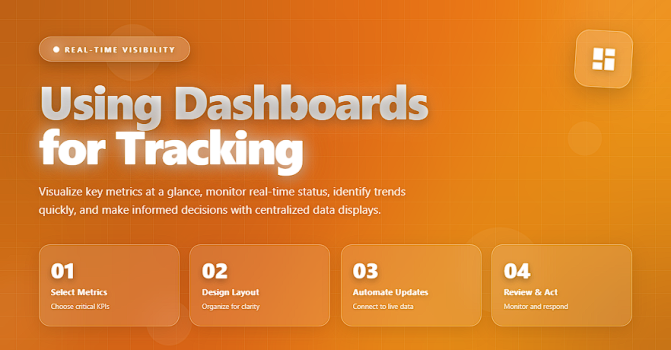
✔️ 1. Integrate With Your Data Sources
Connect dashboards directly to tools like:
- Excel / Google Sheets
- Monday.com
- Jira
- Smartsheet
- Power BI
- Tableau
This ensures real-time updates.
✔️ 2. Define Clear KPIs
Select KPIs that reflect true project health — not vanity metrics.
Examples:
- on-time delivery rate
- cost variance
- task cycle time
- defect escape percentage
✔️ 3. Create Visual Alerts
Use color coding:
🟢 On Track
🟡 At Risk
🔴 Critical
This allows instant recognition of problem areas.
✔️ 4. Keep Dashboards Simple and Action-Oriented
Avoid unnecessary charts.
A dashboard should answer three questions clearly:
➡️ Where are we now?
➡️ Where are we off track?
➡️ What needs attention next?
✔️ 5. Review Dashboards in Every Meeting
Weekly meetings should revolve around dashboard insights — not lengthy status reports.
Dashboards drive structured, data-driven conversations.
✔️ 6. Use Dashboards for Stakeholder Communication
Executives prefer visual updates.
Dashboards simplify discussions and eliminate confusion.
✔️ 7. Continuously Improve Your Dashboard Design
Review your dashboard’s usefulness regularly and refine it as the project evolves.
❌ Common Mistakes to Avoid
❌ Overloading the dashboard with too many metrics
❌ Showing data without context or interpretation
❌ Using outdated manual data entry
❌ No alignment with project KPIs
❌ Not customizing dashboards for different stakeholder groups
⭐ Best Practices
✔️ Use consistent color codes
✔️ Connect dashboards to automated data sources
✔️ Include narrative insights (what the data means)
✔️ Build separate dashboards for team leaders and executives
✔️ Link dashboards to your project plans, risks, and KPIs
✔️ Keep dashboards real-time, simple, and intuitive
⭐ Final Thoughts
Dashboards are one of the most powerful tools in modern project management.
They help teams stay synchronized, detect risks early, manage workloads intelligently, and make better decisions. By turning project data into clear, actionable insights, dashboards elevate project performance and improve communication across all levels.
Strong project managers monitor progress.
Great project managers visualize it.






